Toy Story Font Generator
Create Toy Story style title text with Willy (TOY) and Rumble (STORY) replica fonts
About Toy Story Font Generator
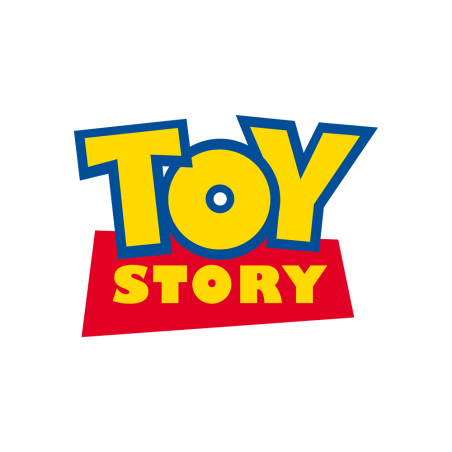
Toy Story style stacked lettering: Willy for TOY and Rumble for STORY
Toy Story is Pixar's landmark animated franchise with one of the most recognizable logo treatments in pop culture. A close fan-made replica is often built with two fonts: Willy for the top word "TOY" and Rumble for the bottom word "STORY". This generator is tuned for that stacked title look, combining bold outlines, bright yellow-blue contrast, and punchy cartoon shadows for memes, invitations, and social graphics.
Fonts Used
Willy
Primary font
Rumble
Secondary font
Font Generator Tools
Related themes
The Life Of A Showgirl Font
Create sophisticated text effects with Gazzetta Slanted typography inspired by theatrical performance and artistic elegance
Squid Game Font
Create text effects with authentic Squid Game poster fonts
Harry Potter Font
Create magical text effects with authentic Harry Potter movie fonts
Stranger Things Font
Create retro 80s text effects with authentic Stranger Things style
Geometry Dash Font
Create arcade pixel text effects inspired by Geometry Dash
How to Use Toy Story Font Generator
Follow these steps to create clean, playful Toy Story style text graphics in minutes.
Frequently Asked Questions
Is this Toy Story font generator free to use?+
Yes. The generator is free for personal use scenarios such as fan content, mockups, and social posts.
What font is used in the Toy Story logo?+
The official logo uses custom studio typography. For fan-made replicas, a common pairing is Willy (for "TOY") and Rumble (for "STORY"). This generator is tuned for that two-line structure.
Can I use Toy Story style text for commercial designs?+
Be careful: Willy and Rumble are free for personal use, not automatically free for commercial use. You should obtain font licensing permission and also review trademark/copyright rules.
How do I get the most authentic Toy Story look?+
Use short uppercase titles, high-contrast yellow/blue combinations, and medium-to-thick outlines. Keep the composition simple and centered.
Does this work on phone screens?+
Yes. The page is responsive and presets are tuned to keep text legible on mobile layouts and social thumbnails.